[Multi Cloud] AWS-OCI VPN tunnel 이중화 (BGP)_6.AWS-OCI VPN2 구성(AWS)
6.1. 임시 Customer Gateway
6.1.1. 개요
- OCI 측의 VPN tunnel IP를 Customer Gateway로 생성해야 하지만, 아직 OCI 측 tunnel IP를 모르기 때문에 임시 Customer Gateway를 생성 (2.2.2.2)
VPN1 생성 했을 때 사용한 Customer gateway(1.1.1.1)를 사용해도 무방함
(단, AWS에서 VPN1과 VPN2를 동시에 생성하는 경우 두 개의 임시 Customer gateway를 생성해야 함)
6.1.2. 설정
VPC → Customer Gateway → Create customer gateway 클릭
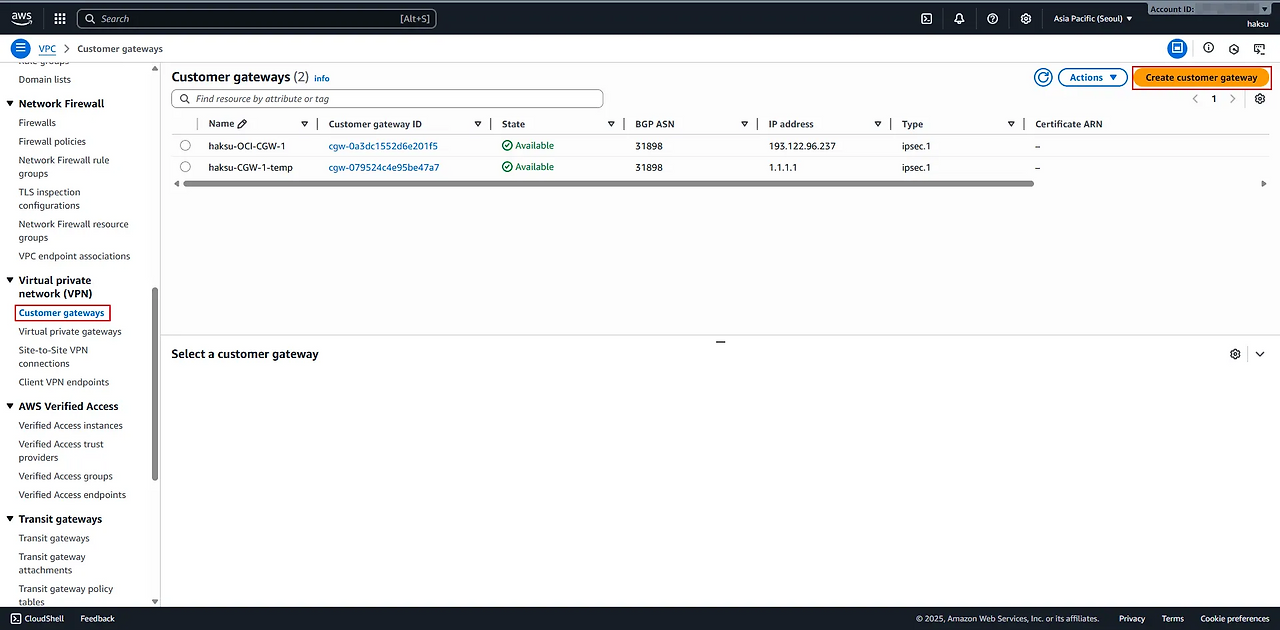
- Create customer gateway
- Name tag : <적절한 이름 입력>
- BGP ASN : 31898 (OCI 측 ASN은 31898 사용)
- IP address : <적절한 임시 IP 입력>
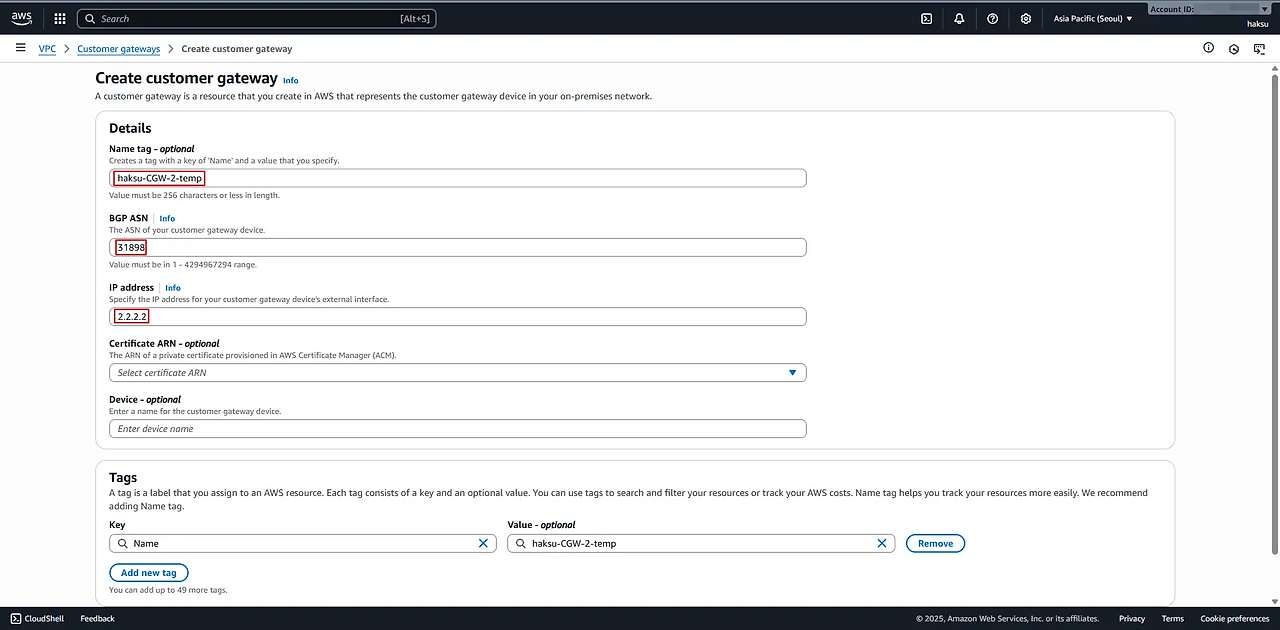
OCI 측 BGP ASN은 31898으로, 이를 변경할 수 있는 화면이 OCI Console 내 존재하지 않음 (변경 불가한 항목으로 보여짐, 공식적으로 불가하다라는 내용이 명시되어 있지는 않음)
(https://docs.oracle.com/en-us/iaas/Content/Network/Tasks/ip-sec-tunnel_update.htm) - 생성 확인
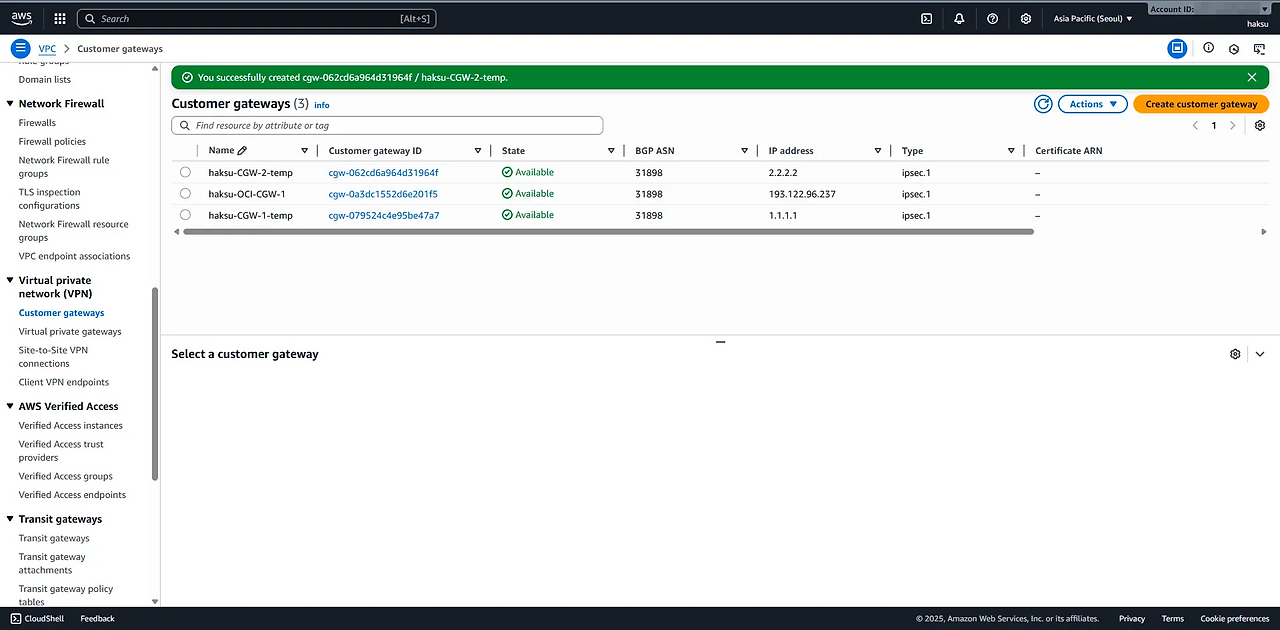
6.2. Transit gateway
6.2.1. 설정
- 기존 VPN1 생성할 때 설정하였으므로, 생략
6.3. Site-to-Site VPN
6.3.1. VPN 생성
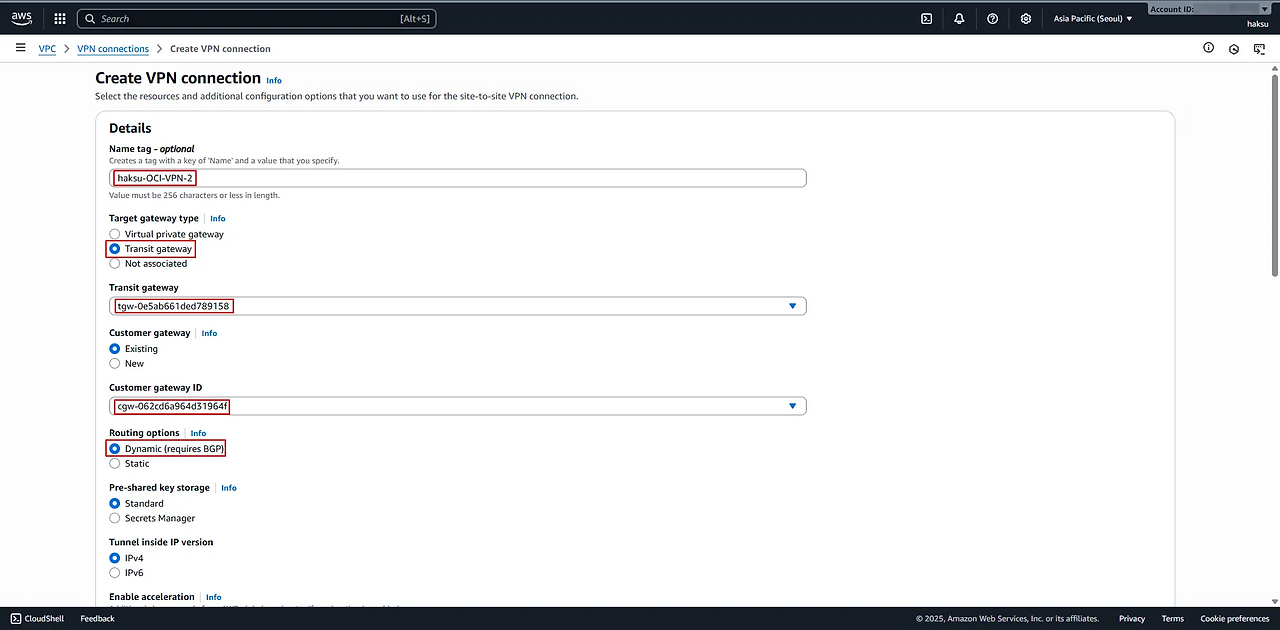
VPC → Virtual private network (VPN) Connections→ Create VPN Connection
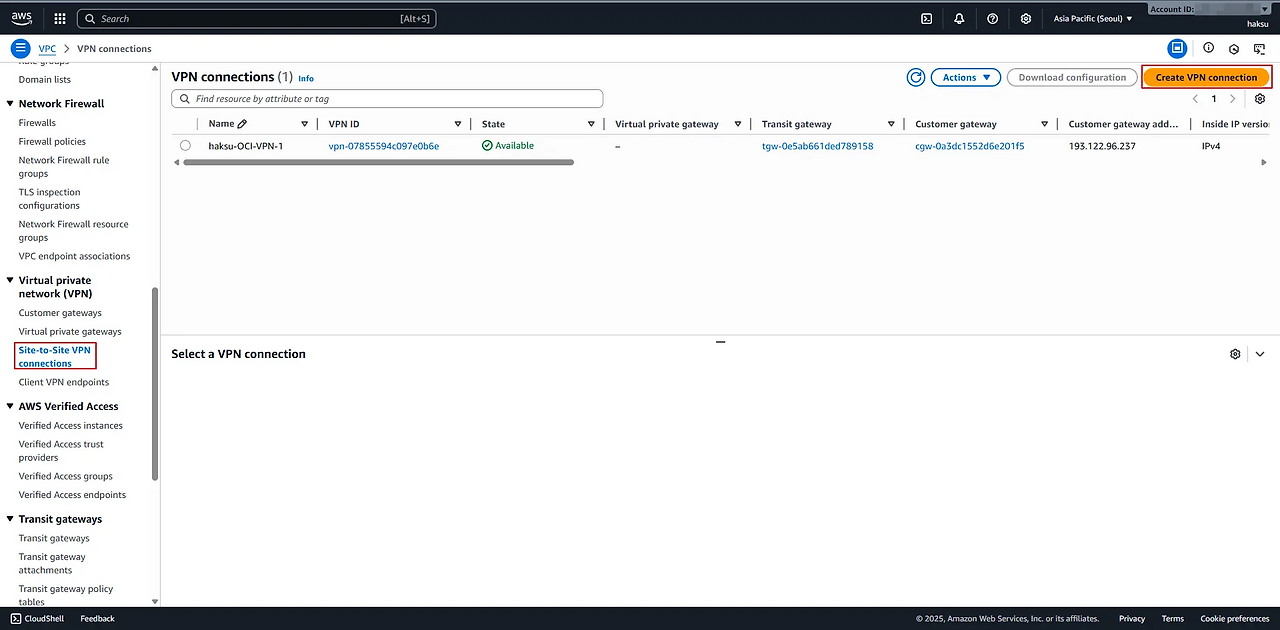
- Create VPN connection
- Name tag : <적절한 이름 입력>
- Transit gateway type : Transit gateway 선택
- Transit gateway : <위에서 생성한 Transit gateway 선택>
- Customer gateway ID : <위에서 생성한 임시 Customer gateway 선택>
- Routing options : Dynamic (requires BGP) 선택
- tunnel 1 options - optional
- Inside IPv4 CIDR for tunnel 1 : <OCI 불가 CIDR 제외 하여 입력>
아래 IP 범위는 VPN tunnel Inside Interface로 사용 불가
- 169.254.10.0 ~ 169.254.19.255
- 169.254.100.0 ~ 169.254.109.255
- 169.254.192.0 ~ 169.254.201.255
( https://docs.oracle.com/en-us/iaas/Content/Network/Tasks/settingupIPsec.htm )- IPSec VPN 터널을 구성할 때, 터널 내부에서 서로 통신할 수 있는 IP 주소가 필요
- VPN 터널의 내부 IP는 외부 인터넷이나 다른 네트워크와 직접 연결되지 않음
- /30 Subnet을 선택해야 하는 이유는 VPN 터널 내부에서 단 두 개의 IP만 필요 - Advanced options for tunnel 1 : Phase 1, 2에서 사용할 알고리즘 선택 (여기서는 기본 값으로 이용)
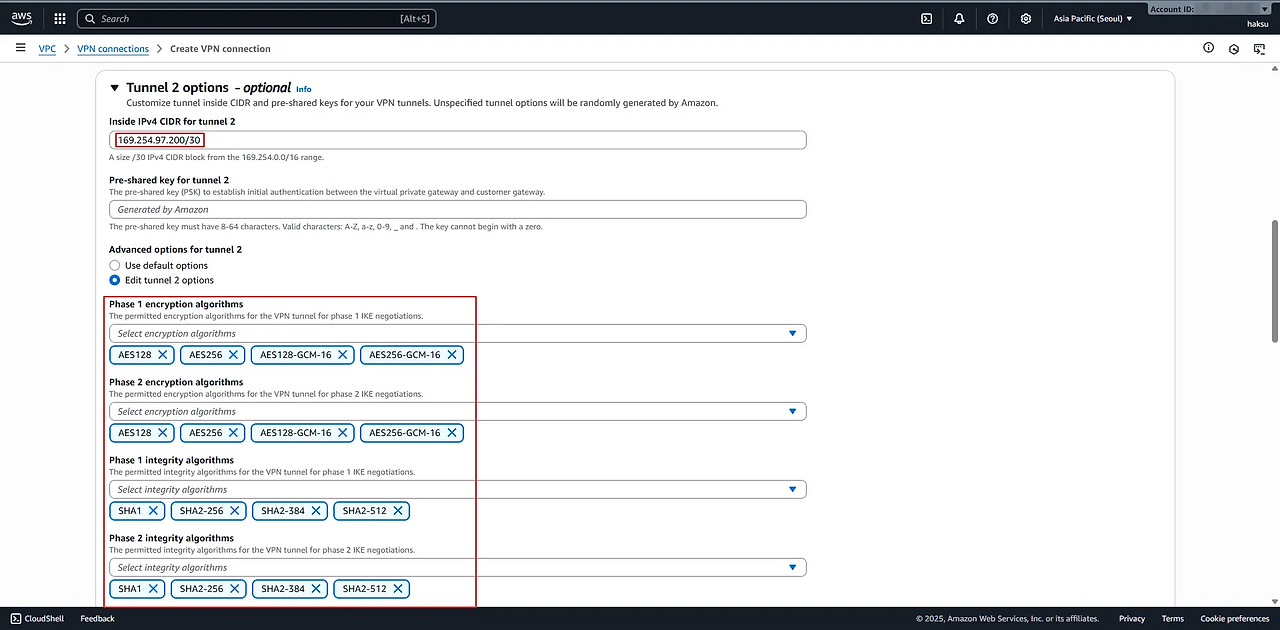
- Inside IPv4 CIDR for tunnel 1 : <OCI 불가 CIDR 제외 하여 입력>
- 생성 확인
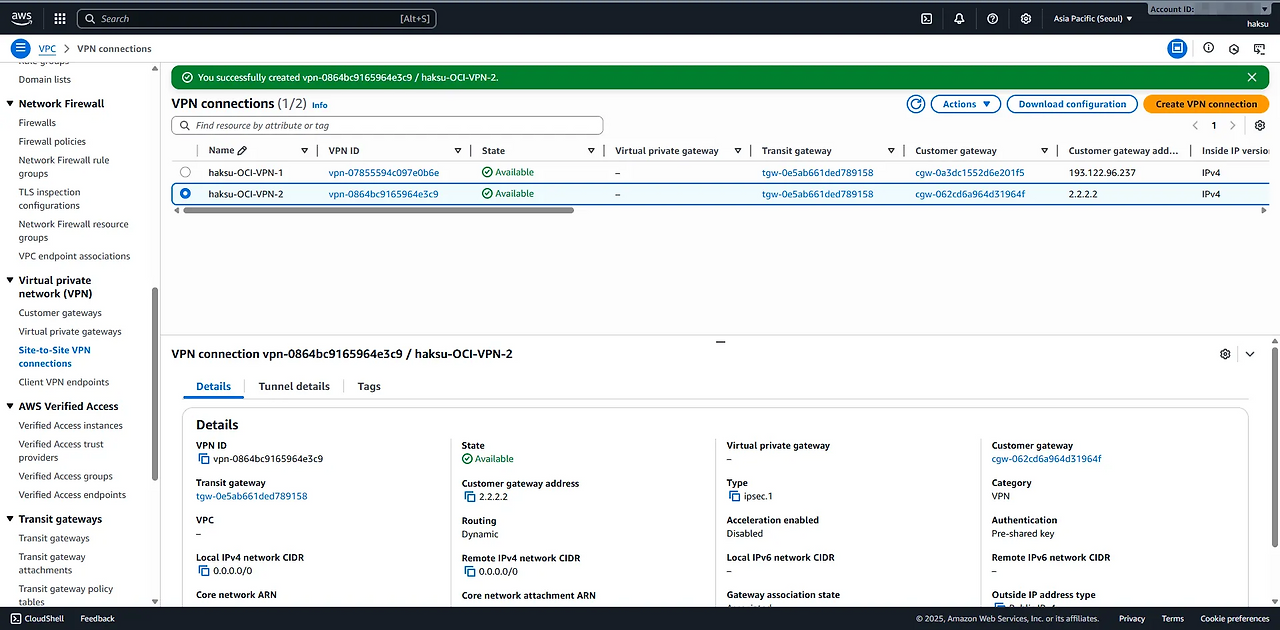
6.3.2. Configuration 파일 다운 및 확인
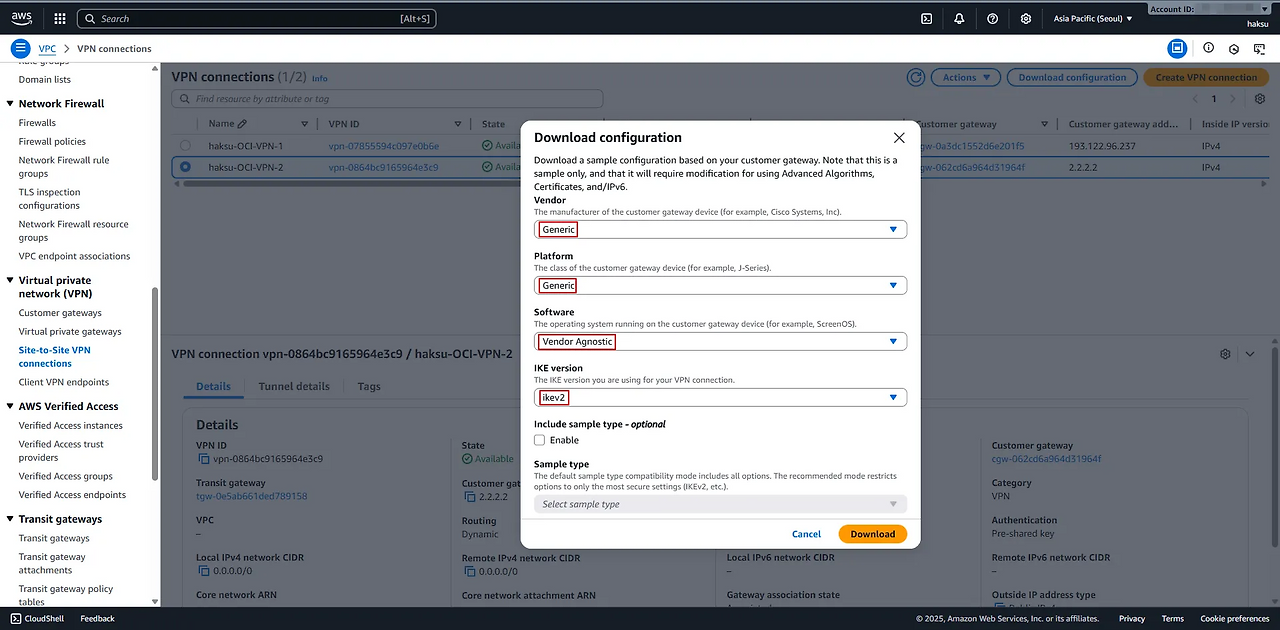
우측 상단 → Download configuration 클릭
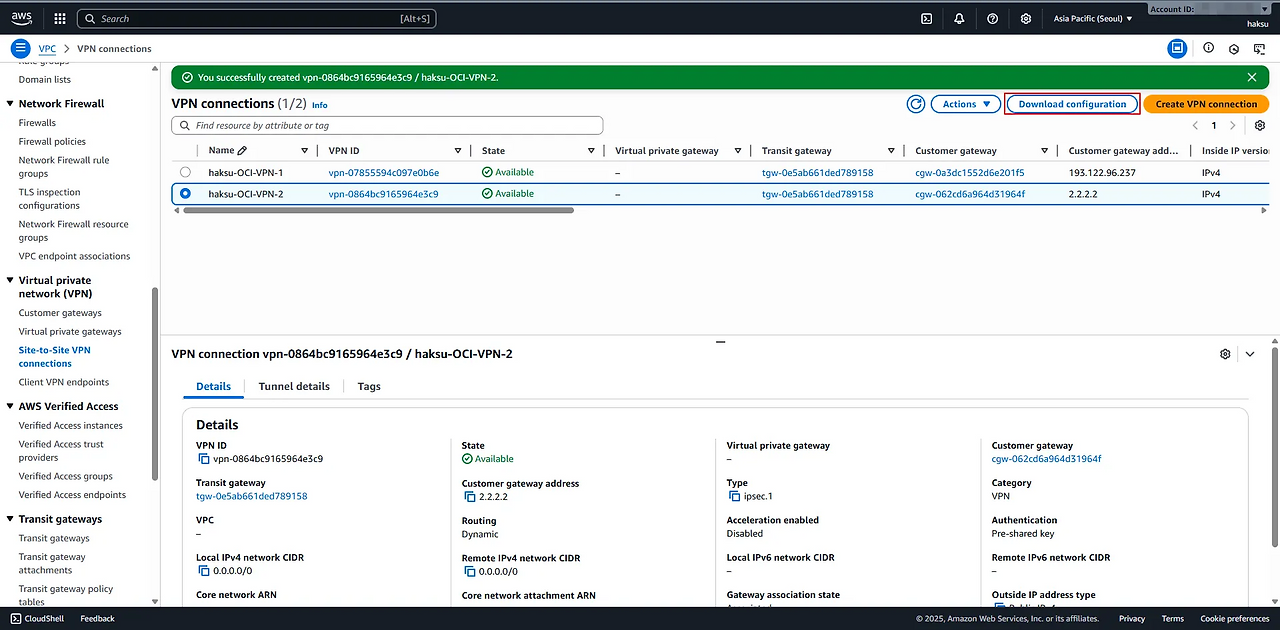
- Download configuration
- Vendor : Generic 선택
- Platform : Generic 선택
- Software : Vendor Agnostic
- IKE version : ikev2 선택
configuration 확인 (tunnel 1)
1
2
3
4
5
6
7
8
9
10
11
12
13
14
15
16
17
18
19
20
21
22
23
24
25
26
27
28
29
30
31
32
33
34
35
36
37
38
39
40
41
42
43
44
45
46
47
48
49
50
51
52
53
54
55
56
57
58
59
60
61
62
63
64
65
66
67
68
69
70
71
72
73
74
75
76
77
78
79
80
81
82
83
84
85
86
87
88
89
90
91
92
93
94
95
96
97
98
99
100
101
102
103
104
105
106
107
108
109
110
111
112
113
114
115
116
117
118
 Amazon Web Services
 Virtual Private Cloud

 VPN Connection Configuration
 ================================================================================
 AWS utilizes unique identifiers to manipulate the configuration of
 a VPN Connection. Each VPN Connection is assigned a VPN Connection Identifier
 and is associated with two other identifiers, namely the
 Customer Gateway Identifier and the Virtual Private Gateway Identifier.

 Your VPN Connection ID		         : vpn-0864bc9165964e3c9
 Your Virtual Private Gateway ID          :
 Your Customer Gateway ID    		 : cgw-062cd6a964d31964f

 A VPN Connection consists of a pair of IPSec tunnel security associations (SAs).
 It is important that both tunnel security associations be configured.


 IPSec Tunnel #1
 ================================================================================
 #1: Internet Key Exchange Configuration

 Configure the IKE SA as follows:
 Please note, these sample configurations are for the minimum requirement of AES128, SHA1, and DH Group 2.
 Category "VPN" connections in the GovCloud region have a minimum requirement of AES128, SHA2, and DH Group 14.
 You will need to modify these sample configuration files to take advantage of AES256, SHA256, or other DH groups like 2, 14-18, 22, 23, and 24.
 NOTE: If you customized tunnel options when creating or modifying your VPN connection, you may need to modify these sample configurations to match the custom settings for your tunnels.

 Higher parameters are only available for VPNs of category "VPN," and not for "VPN-Classic".
 The address of the external interface for your customer gateway must be a static address.
 Your customer gateway may reside behind a device performing network address translation (NAT).
 To ensure that NAT traversal (NAT-T) can function, you must adjust your firewall !rules to unblock UDP port 4500.
 If not behind NAT, and you are not using an Accelerated VPN, we recommend disabling NAT-T. If you are using an Accelerated VPN, make sure that NAT-T is enabled.
 - IKE version              : IKEv2
 - Authentication Method    : Pre-Shared Key
 - Pre-Shared Key           : lQfupG7v96njrZOG3IRnRuuytx3mXeDC
 - Authentication Algorithm : sha1
 - Encryption Algorithm     : aes-128-cbc
 - Lifetime                 : 28800 seconds
 - Phase 1 Negotiation Mode : main
 - Diffie-Hellman           : Group 2

 #2: IPSec Configuration

 Configure the IPSec SA as follows:
 Category "VPN" connections in the GovCloud region have a minimum requirement of AES128, SHA2, and DH Group 14.
 Please note, you may use these additionally supported IPSec parameters for encryption like AES256 and other DH groups like 2, 5, 14-18, 22, 23, and 24.
 NOTE: If you customized tunnel options when creating or modifying your VPN connection, you may need to modify these sample configurations to match the custom settings for your tunnels.

 Higher parameters are only available for VPNs of category "VPN," and not for "VPN-Classic".
 - Protocol                 : esp
 - Authentication Algorithm : hmac-sha1-96
 - Encryption Algorithm     : aes-128-cbc
 - Lifetime                 : 3600 seconds
 - Mode                     : tunnel
 - Perfect Forward Secrecy  : Diffie-Hellman Group 2

 IPSec Dead Peer Detection (DPD) will be enabled on the AWS Endpoint. We
 recommend configuring DPD on your endpoint as follows:
 - DPD Interval             : 10
 - DPD Retries              : 3

 IPSec ESP (Encapsulating Security Payload) inserts additional
 headers to transmit packets. These headers require additional space,
 which reduces the amount of space available to transmit application data.
 To limit the impact of this behavior, we recommend the following
 configuration on your Customer Gateway:
 - TCP MSS Adjustment       : 1379 bytes
 - Clear Don't Fragment Bit : enabled
 - Fragmentation            : Before encryption

 #3: Tunnel Interface Configuration

 Your Customer Gateway must be configured with a tunnel interface that is
 associated with the IPSec tunnel. All traffic transmitted to the tunnel
 interface is encrypted and transmitted to the Virtual Private Gateway.


 The Customer Gateway and Virtual Private Gateway each have two addresses that relate
 to this IPSec tunnel. Each contains an outside address, upon which encrypted
 traffic is exchanged. Each also contain an inside address associated with
 the tunnel interface.

 The Customer Gateway outside IP address was provided when the Customer Gateway
 was created. Changing the IP address requires the creation of a new
 Customer Gateway.

 The Customer Gateway inside IP address should be configured on your tunnel
 interface.

 Outside IP Addresses:
 - Customer Gateway 		        : 2.2.2.2
 - Virtual Private Gateway	        : 15.164.201.33

 Inside IP Addresses
 - Customer Gateway         		: 169.254.60.2/30
 - Virtual Private Gateway             : 169.254.60.1/30

 Configure your tunnel to fragment at the optimal size:
 - Tunnel interface MTU     : 1436 bytes

 #4: Border Gateway Protocol (BGP) Configuration:

 The Border Gateway Protocol (BGPv4) is used within the tunnel, between the inside
 IP addresses, to exchange routes from the VPC to your home network. Each
 BGP router has an Autonomous System Number (ASN). Your ASN was provided
 to AWS when the Customer Gateway was created.

 BGP Configuration Options:
 - Customer Gateway ASN	          : 31898
 - Virtual Private  Gateway ASN          : 64512
 - Neighbor IP Address     		  : 169.254.60.1
 - Neighbor Hold Time       : 30

 Configure BGP to announce routes to the Virtual Private Gateway. The gateway
 will announce prefixes to your customer gateway based upon the prefix you
 assigned to the VPC at creation time.
configuration 확인 (tunnel 2)
1
2
3
4
5
6
7
8
9
10
11
12
13
14
15
16
17
18
19
20
21
22
23
24
25
26
27
28
29
30
31
32
33
34
35
36
37
38
39
40
41
42
43
44
45
46
47
48
49
50
51
52
53
54
55
56
57
58
59
60
61
62
63
64
65
66
67
68
69
70
71
72
73
74
75
76
77
78
79
80
81
82
83
84
85
86
87
88
89
90
91
92
93
94
95
96
97
98
99
100
101
102
103
104
105
106
107
108
109
110
 IPSec Tunnel #2
 ================================================================================
 #1: Internet Key Exchange Configuration

 Configure the IKE SA as follows:
 Please note, these sample configurations are for the minimum requirement of AES128, SHA1, and DH Group 2.
 Category "VPN" connections in the GovCloud region have a minimum requirement of AES128, SHA2, and DH Group 14.
 You will need to modify these sample configuration files to take advantage of AES256, SHA256, or other DH groups like 2, 14-18, 22, 23, and 24.
 NOTE: If you customized tunnel options when creating or modifying your VPN connection, you may need to modify these sample configurations to match the custom settings for your tunnels.

 Higher parameters are only available for VPNs of category "VPN," and not for "VPN-Classic".
 The address of the external interface for your customer gateway must be a static address.
 Your customer gateway may reside behind a device performing network address translation (NAT).
 To ensure that NAT traversal (NAT-T) can function, you must adjust your firewall !rules to unblock UDP port 4500.
 If not behind NAT, and you are not using an Accelerated VPN, we recommend disabling NAT-T. If you are using an Accelerated VPN, make sure that NAT-T is enabled.
 - IKE version              : IKEv2
 - Authentication Method    : Pre-Shared Key
 - Pre-Shared Key           : sto7ty8E.POgYg6nJ.GWvHeNkeip0s4T
 - Authentication Algorithm : sha1
 - Encryption Algorithm     : aes-128-cbc
 - Lifetime                 : 28800 seconds
 - Phase 1 Negotiation Mode : main
 - Diffie-Hellman           : Group 2

 #2: IPSec Configuration

 Configure the IPSec SA as follows:
 Category "VPN" connections in the GovCloud region have a minimum requirement of AES128, SHA2, and DH Group 14.
 Please note, you may use these additionally supported IPSec parameters for encryption like AES256 and other DH groups like 2, 5, 14-18, 22, 23, and 24.
 NOTE: If you customized tunnel options when creating or modifying your VPN connection, you may need to modify these sample configurations to match the custom settings for your tunnels.

 Higher parameters are only available for VPNs of category "VPN," and not for "VPN-Classic".
 - Protocol                 : esp
 - Authentication Algorithm : hmac-sha1-96
 - Encryption Algorithm     : aes-128-cbc
 - Lifetime                 : 3600 seconds
 - Mode                     : tunnel
 - Perfect Forward Secrecy  : Diffie-Hellman Group 2

 IPSec Dead Peer Detection (DPD) will be enabled on the AWS Endpoint. We
 recommend configuring DPD on your endpoint as follows:
 - DPD Interval             : 10
 - DPD Retries              : 3

 IPSec ESP (Encapsulating Security Payload) inserts additional
 headers to transmit packets. These headers require additional space,
 which reduces the amount of space available to transmit application data.
 To limit the impact of this behavior, we recommend the following
 configuration on your Customer Gateway:
 - TCP MSS Adjustment       : 1379 bytes
 - Clear Don't Fragment Bit : enabled
 - Fragmentation            : Before encryption

 #3: Tunnel Interface Configuration

 Your Customer Gateway must be configured with a tunnel interface that is
 associated with the IPSec tunnel. All traffic transmitted to the tunnel
 interface is encrypted and transmitted to the Virtual Private Gateway.


 The Customer Gateway and Virtual Private Gateway each have two addresses that relate
 to this IPSec tunnel. Each contains an outside address, upon which encrypted
 traffic is exchanged. Each also contain an inside address associated with
 the tunnel interface.

 The Customer Gateway outside IP address was provided when the Customer Gateway
 was created. Changing the IP address requires the creation of a new
 Customer Gateway.

 The Customer Gateway inside IP address should be configured on your tunnel
 interface.

 Outside IP Addresses:
 - Customer Gateway 		        : 2.2.2.2
 - Virtual Private Gateway	        : 52.79.45.9

 Inside IP Addresses
 - Customer Gateway         		: 169.254.97.202/30
 - Virtual Private Gateway             : 169.254.97.201/30

 Configure your tunnel to fragment at the optimal size:
 - Tunnel interface MTU     : 1436 bytes

 #4: Border Gateway Protocol (BGP) Configuration:

 The Border Gateway Protocol (BGPv4) is used within the tunnel, between the inside
 IP addresses, to exchange routes from the VPC to your home network. Each
 BGP router has an Autonomous System Number (ASN). Your ASN was provided
 to AWS when the Customer Gateway was created.

 BGP Configuration Options:
 - Customer Gateway ASN	          : 31898
 - Virtual Private  Gateway ASN          : 64512
 - Neighbor IP Address     		  : 169.254.97.201
 - Neighbor Hold Time       : 30

 Configure BGP to announce routes to the Virtual Private Gateway. The gateway
 will announce prefixes to your customer gateway based upon the prefix you
 assigned to the VPC at creation time.


 Additional Notes and Questions
 ================================================================================

 - Amazon Virtual Private Cloud Getting Started Guide:
     http://docs.amazonwebservices.com/AmazonVPC/latest/GettingStartedGuide
 - Amazon Virtual Private Cloud Network Administrator Guide:
     http://docs.amazonwebservices.com/AmazonVPC/latest/NetworkAdminGuide